Chapter 0 · Learning Statistics with Python
Basics of Python
Python as a calculator, numbers, strings, lists, tuples, sets, dictionaries, control flow, comprehensions, functions, error handling, modules, NumPy arrays and SciPy probabilities.
Prof. Xuhu Wan
ISOM, HKUST Business School · 2026 Edition
What This Chapter Builds
- The four scalar types (
int,float,bool,str) and the arithmetic traps between them. - The four containers (
list,tuple,set,dict) — which ones you can change, which ones you can index, and what “the same object” means. if/for/while/break/continue, then the one-line loop: the list comprehension.- Functions with defaults,
*args,**kwargs,lambda, scope, andtry/except. - A guided practice example — word counts from raw text — combines the tools.
- Modules, NumPy arrays and SciPy connect ordinary Python with numerical and statistical work.
Why this matters
Later data analysis relies on ordinary Python rules: names refer to objects, methods use parentheses, functions accept arguments, and containers hold values. If items[0:4], key=lambda …, **kwargs, or a KeyError still looks unfamiliar, it is harder to interpret the result. This chapter builds that foundation.
Week 1: learn to read, run and explain code
Chapter 0 reviews the Python needed for Chapter 1. Both chapters prepare you for one ungraded, in-class retail inventory case.
| Preparation | What to bring into the case |
|---|---|
| Read each section and predict before running | An explanation of the operation, not just its output |
| Run the small examples in order | One changed input and the result you expected |
| Bring your compact note | Main rules, one mistake and a question |
Practice cells are preparation aids. There is no take-home assignment. Videos will accompany the slides when available.
Running Python: the cell and the kernel
A cell contains code. The kernel remembers names and objects from cells you have already run.
- Read the code and make a prediction before pressing Run.
- In these slides, Run Code includes the cell’s folded Previously introduced setup.
- Change one input in the current cell, predict again, then rerun it.
- Expand the setup to inspect the earlier imports, data and definitions.
Browser slides need no installation. In Colab, use Shift + Enter and save your notebook. Restarting the kernel clears its memory.
How to use the numbered learning path
Follow the numbered parts in order within each section. Each part states a question and a result. Read the concept, predict the example, run it, and explain the output before attempting the check.
The 3.5-hour class selects examples, group discussion and notebook work. The complete Slides and Book support self-study.
Worked examples run automatically when the page opens or refreshes. Each cell includes required earlier imports, data and definitions under Previously introduced setup. Run Code includes that setup; Copy complete code copies the whole cell. Practice and repair cells run when you choose. Make input changes in the current cell before the operation you are testing.
Roadmap
| Section | Concept | Tool |
|---|---|---|
| 0.1 | Python as a calculator; numbers, booleans, strings | / vs //, type(), slicing s[a:b:c], string methods |
| 0.2 | Containers and the mutability / aliasing rules | list, tuple, set, dict, .copy(), is vs == |
| 0.3 | Control flow and list comprehensions | if/elif/else, for, while, break, continue, [… for … if …] |
| 0.4 | Functions, lambdas, f-strings, error handling | def, defaults, *args/**kwargs, lambda, f"{x:.2f}", try/except |
| 0.5 | Reusable tools, arrays and probability models | import, %pip, np.array, masks, stats.norm.cdf/ppf/pdf |
Values, Numbers and Strings
| Part | Question |
|---|---|
| 0.1.1 Values and numerical expressions | How does Python evaluate and store a calculation? |
| 0.1.2 Booleans and comparisons | How does a comparison become a decision? |
| 0.1.3 Strings, slices and methods | How do we select and clean recorded text? |
Values and numerical expressions
Question: How does Python evaluate and store a calculation?
Result: Trace an expression, assignment and numerical type.
Begin with the definitions and assumptions; then trace the worked example.
Values, expressions and assignment
A value is one item; its type determines the operations it supports. An expression computes a value. Assignment binds a name to the result.
Read the last line: look up units and price → multiply their values → bind the result to amount.
| Type | Example | Useful question |
|---|---|---|
int |
10 |
How many whole items? |
float |
44.99 |
What measured or calculated amount? |
bool |
units > 0 |
Is this condition true? |
str |
"SKU-101" |
What text or identifier? |
= assigns. == compares. print(amount) displays a value.
Start with the obvious
A cell executes its statements top to bottom. print(...) displays each requested value. Predict the second line.
3, 5.0, 1024, 1. The .0 on the second line is the first trap: / always returns a float, even when the answer is a whole number.
Two divisions, not one
/ is true division; // is floor division. Commit to an answer for the negative case before running.
What does print(10 // 3, -10 // 3, 10 % 3) print?
3 -3 13.0 -3.0 13 -4 13.33 -3.33 1
Confirm the floor
3.3333333333333335, then 3 -4 1. Floor division rounds down — -3.33 floors to -4. In finance you will use // to count whole lots (shares // 100) and % for the odd lot (shares % 100); get the sign wrong on a short position and the lot count is off by one.
int, float, and what type() tells you
Mixing an int with a float promotes the result to float (45.14159). Python never silently truncates — but floats have their own trap, next slide.
Is 0.1 + 0.2 equal to 0.3?
What does print(0.1 + 0.2 == 0.3) print?
TrueFalse- It raises a
TypeError 0.3
False, 0.30000000000000004, True. Computed decimal quantities can differ by rounding error. Use a tolerance appropriate to the calculation when testing approximate equality; == remains appropriate for exact labels and categories.
Booleans and comparisons
Question: How does a comparison become a decision?
Result: Interpret True and False and check numerical precision.
Builds on Values and numerical expressions.
Booleans are integers in disguise
True is 1, False is 0. Predict the sum.
What does the last line print?
1
1, then <class 'bool'> 2. Because booleans add, sum(returns > 0) counts the up-days in Chapter 1 — a bool is a subclass of int.
Strings, slices and methods
Question: How do we select and clean recorded text?
Result: A correctly sliced and cleaned string with the result assigned.
Builds on Booleans and comparisons.
Strings are sequences: index and slice them
s[start:stop:step] — start inclusive, stop exclusive. Predict two of the six lines.
With s = ‘data Analysis’, what are s[0:4] and s[::2]?
'data'and'dt nlss''data 'and'dt nlss''data'and'aaAayi''dat'and'dt nlss'
Run the six slices
d, s, data, data, Analysis, dt nlss. The stop-exclusive rule also slices lists and tuples. Use the same start-inclusive, stop-exclusive rule for strings, lists and tuples.
Trace the slice on indexed characters
Objects have methods: object.method(args)
Every value in Python is an object, and each object carries functions that belong to it. You call them with a dot.
split is the one to remember: it turns one string into a list of strings — the first step of the text mini-project in §0.4.
Did s.upper() change s?
After s = ” hello, world “; s.upper(), what does print(s) show?
' HELLO, WORLD '' hello, world 'None- It raises an error
' hello, world ', then ' HELLO, WORLD '. To keep the changed text, assign the returned string: s = s.upper().
Your turn: clean a string, raise a power
Turn s into 'HELLO, WORLD' (strip the spaces, then upper-case — chain two methods), and set power to \(2^{10}\) using the exponentiation operator, not *.
What you discovered
/always returns a float;//floors toward \(-\infty\) (-10 // 3is-4);%is the remainder.
0.1 + 0.2 != 0.3— compare floats with a tolerance, never==.
True + Trueis2: booleans are integers, which is whysum(condition)counts.
- Slices are start-inclusive, stop-exclusive, and the same rule applies to strings, lists and tuples.
- Strings are immutable:
s.upper()returns a new string; keep it withs = s.upper().
Next: §0.2 — containers, and the difference between a copy and a second name for the same object.
Containers and Object Identity
| Part | Question |
|---|---|
| 0.2.1 Lists, identity and copies | Can two names refer to the same mutable object? |
| 0.2.2 Tuples and sets | Do we need fixed order or unique membership? |
| 0.2.3 Dictionaries and container checks | How do names connect to stored values? |
Lists, identity and copies
Question: Can two names refer to the same mutable object?
Result: Trace an edit through an alias and through an independent copy.
Begin with the definitions and assumptions; then trace the worked example.
Choosing a container
Choose by the meaning of the collection. A position answers “which item in this order?”; a name answers “which named item?”
| Container | Access | Can change it? | Typical use |
|---|---|---|---|
list |
Position: prices[0] |
Yes | Ordered observations |
tuple |
Position: point[0] |
No item replacement | A fixed record |
set |
Membership: sku in skus |
Yes | Unique identifiers |
dict |
Name: policy["capacity"] |
Yes | Named parameters or lookups |
A set has no first item. A dictionary preserves insertion order, but its lookup uses names. Strings and tuples support slicing; sets and dictionaries do not.
Lists: ordered, mutable, mixed types
Predict the first line before you run.
[20, 30] → [10, 20, 30, 40, 50] → [10, 15, 20, 30, 40] removed: 50 → 10 40 [15, 20]. append, insert, pop all edit the list in place — no assignment needed.
The aliasing trap
Two names, one list. Predict before running — this one costs people real money.
nums = [10, 20, 30, 40]; alias = nums; alias.append(50). What is nums now?
[10, 20, 30, 40]- It raises an error —
numsis protected [10, 20, 30, 40, 50][50, 10, 20, 30, 40]
Alias vs copy
nums: [10, 20, 30, 40, 50] alias: [10, 20, 30, 40, 50] then nums: [10, 20, 30, 40, 50] copy: [10, 20, 30, 40, 50, 15]. Assignment binds a name; .copy() creates a new outer list. Nested mutable objects still need attention.
Trace aliasing and copying
is asks about identity; == asks about value
nums = [10, 20, 30, 40]; alias = nums; fresh = [10, 20, 30, 40]. What do nums == fresh, nums is fresh, alias is nums give?
True True TrueTrue False TrueFalse False TrueTrue False False
True False True. Use is only for None (x is None); use == for everything else.
Tuples and sets
Question: Do we need fixed order or unique membership?
Result: Choose a tuple or set and explain its constraints.
Builds on Lists, identity and copies.
Tuples: ordered and immutable
Parentheses instead of brackets, and one difference that matters. Predict.
coords = (34.05, -118.25); coords[0] = 0. What happens?
coordsbecomes(0, -118.25)coordsbecomes(0,)- A
ValueError - A
TypeError— tuples do not support item assignment
See the error, then unpack
TypeError: 'tuple' object does not support item assignment. Unpacking (lat, lon = coords) is how you will receive the (sharpe, max_drawdown) pair from PerformanceMeasure in the projects.
Sets: unique, unordered
{1, 2, 3} 3, True, {1, 2, 3, 4, 5}, {2}, {1, 2, 3}. set(tickers) is the one-line answer to “how many distinct tickers are in this file?”
Can you take the first element of a set?
What does bag[0] do for a set bag?
- Returns the smallest element
- Returns the first element inserted
- Raises
TypeError: 'set' object is not subscriptable - Returns
0
Dictionaries and container checks
Question: How do names connect to stored values?
Result: A lookup by name with an explicit rule for missing entries.
Builds on Tuples and sets.
Dictionaries: name → value
Use .values() to read stored values and .items() to read (name, value) pairs. Both follow insertion order.
Look up a name that is not present
Use dictionary.get(name, default) to read a value when a name may be missing. It returns the stored value if the name exists; otherwise it returns default (None if omitted). Looking up a missing name does not add it to the dictionary.
Before “gpa” is added, student = {“name”: “Alex”, “age”: 20, “skills”: […]}. What do student[“gpa”] and student.get(“gpa”, 0.0) do?
- Both return
None - The first raises
KeyError; the second returns0.0 - Both raise
KeyError - The first returns
0.0; the second raisesKeyError
Attributes vs methods
- Attribute — a property you read:
my_list.__class__tells you the object’s type. No()is needed. - Method — a function belonging to an object, which you call with
():my_list.append(3),text.upper(),text.isalpha().
text.isalpha() checks whether a string is non-empty and contains only letters. It returns True for "tiger"; False for "123", "hello world" (a space), or "" (empty). Digits and punctuation also fail this check. The () runs the check and gives a Boolean answer.
text = “tiger”. What is text.isalpha (no parentheses)?
TrueFalse- The method object itself — not yet called
- A
SyntaxError
The calls return True for "tiger" and False False False for the three counterexamples. Without (), text.isalpha is the method object, not an answer. Read the property; add () when you want to run the method.
Your turn: slice, de-duplicate, summarise
The notebook’s mini-exercise. From the list of 5 numbers nums5: (1) slice the middle three into middle3; (2) convert it to a set — what happens to the duplicate 20?; (3) build stats5 = {'min': …, 'max': …} with min() and max().
What you discovered
- Lists edit in place (
append,insert,pop); tuples refuse (TypeError); strings refuse too.
alias = numsis a second name, not a copy — use.copy()when you want independence.
==compares values,iscompares identity; reserveisforNone.
- Sets collapse duplicates and have no positions (
bag[0]fails);sorted(bag)gives you a list.
d[name]raisesKeyErroron a missing name;d.get(name, default)does not.
- Attributes are read, methods are called —
my_list.__class__vstext.isalpha().
Next: §0.3 — making decisions and repeating them: if, for, while, and the comprehension.
Branches, Loops and Comprehensions
| Part | Question |
|---|---|
| 0.3.1 Conditional execution | Which branch actually runs? |
| 0.3.2 Iteration and loop control | How does repeated work start, continue and stop? |
| 0.3.3 List comprehensions | Can we express a tested loop as a transformation? |
Conditional execution
Question: Which branch actually runs?
Result: Trace the first true condition in an ordered decision rule.
Begin with the definitions and assumptions; then trace the worked example.
Branches and loops answer different questions
| Structure | Question | How execution proceeds |
|---|---|---|
if / elif / else |
Which action applies now? | Test in order → execute the first matching branch → leave the chain |
for item in items |
What should happen to each item? | Take the next item → run the body → repeat until exhausted |
while condition |
Should we repeat again? | Test → run the body if True → test again |
Indentation identifies the body. A while body must make progress towards an exit. break exits a loop; continue skips the rest of its current iteration.
Branches let a programme choose an action; loops let it repeat an action. Here we trace these rules so we can read Python code and write small helper functions.
if / elif / else
With score = 59, which branch fires?
if score >= 90:   grade = "A"
elif score >= 80: grade = "B"
elif score >= 60: grade = "C"
else:             grade = "D or below"
D or below
59 D or below. Indentation is the block — four spaces, no braces. Python stops at the first branch that is True.
Order of branches matters
score = 95. if score >= 60: grade = “C” then elif score >= 90: grade = “A”. What is grade?
"C"— the first true branch wins"A"— the best matching branch wins- Both run;
gradeends as"A" - A
SyntaxError— thresholds must be increasing
Trace the branch that actually runs
Iteration and loop control
Question: How does repeated work start, continue and stop?
Result: A loop with explicit range boundaries and stopping behaviour.
Builds on Conditional execution.
for loops and enumerate
Indices start at 0. enumerate(cities, 1) starts the counter at 1 — useful for printing ranks. You never write for i in range(len(cities)) in idiomatic Python.
How many numbers in range(1, 5)?
What does list(range(1, 5)) return?
[1, 2, 3, 4, 5][1, 2, 3, 4][0, 1, 2, 3, 4][1, 5]
while: repeat until a condition fails
Warning
Forget n = n - 1 and the loop never ends. Use while only when you do not know the number of iterations in advance (e.g. “keep bidding until the order fills”); otherwise use for.
break stops; continue skips
for x in range(1, 11): if x % 3 == 0: continue; print(x, end=” “). Output?
1 23 6 91 2 4 5 7 8 101 2 3 4 5 6 7 8 9 10
Run both
First multiple of 7: 7 and 1 2 4 5 7 8 10. break is how a search loop exits early; continue is how a cleaning loop discards bad rows without nesting the whole body in an if.
Your turn: FizzBuzz
Fill the list fizz for 1..20: multiples of 3 become "Fizz", multiples of 5 "Buzz", multiples of both "FizzBuzz", everything else the number as a string. Test the “both” case first.
List comprehensions
Question: Can we express a tested loop as a transformation?
Result: Translate a loop into a comprehension without changing its result.
Builds on Iteration and loop control.
[new_item for item in iterable if condition] — a loop that builds a list in one expression. Predict what each variant produces before you run it.
The loop and its one-line twin
What does [x**2 for x in range(0, 6)] return?
[0, 1, 4, 9, 16, 25]
Add a filter
What does [x**2 for x in range(10) if x % 2 == 0] return?
[0, 4, 16, 36, 64][0, 1, 4, 9, 16, 25, 36, 49, 64, 81][1, 9, 25, 49, 81][0, 4, 16, 36, 64, 100]
if after for filters; if … else before for labels
How many elements does [“even” if x % 2 == 0 else “odd” for x in range(6)] have?
- 3
- 0
- 6 — every element gets a label
- It is a
SyntaxError
['even', 'odd', 'even', 'odd', 'even', 'odd'] and ['NYC', 'LA', 'CHICAGO']. The first comprehension labels every number; the second transforms every city name. Neither drops an item.
Your turn: filter, then map
Mirror the even_squares example: build odd_cubes, the cubes of the odd numbers in range(10), as one comprehension. Expected: [1, 27, 125, 343, 729].
What you discovered
- Python takes the first true branch — order
if/eliffrom strictest to loosest.
range(1, 5)is1, 2, 3, 4: the same stop-exclusive rule as slicing.
enumerategives(index, value);for i in range(len(x))is a smell.
breakexits the loop;continueskips to the next iteration;whileneeds a guaranteed exit.
[f(x) for x in xs if cond]filters then maps;[a if c else b for x in xs]labels every element.
Next: §0.4 — wrap the logic in functions, format the output, and survive bad input.
Functions, Formatting and Error Handling
| Part | Question |
|---|---|
| 0.4.1 Function contracts and arguments | What goes into a function and what comes back? |
| 0.4.2 Small functions and scope | Which names exist inside a function? |
| 0.4.3 Formatting and recoverable errors | How do we communicate a result and handle invalid input? |
| 0.4.4 Integrated text lab | Can the parts form a small reproducible workflow? |
Function contracts and arguments
Question: What goes into a function and what comes back?
Result: A function with documented inputs, defaults and a returned value.
Begin with the definitions and assumptions; then trace the worked example.
A function has an input and an output contract
Call add(10) → bind local a=10 and default b=32 → compute a+b → return the result to the caller.
print displays information. return supplies the value another expression can use. A function that finishes without return supplies None.
First master required inputs and return values. The later *args and **kwargs examples explain flexible function signatures you will encounter.
Define, document, call
def show(x): print(x) then r = show(5). What is r?
5None"5"- A
TypeError
Trace a function call and its result
Default arguments
What do the two calls print?
def greet(name, title="Student"):
    return f"Hello {title} {name}!"
print(greet("Alex")); print(greet("Alex", title="Dr."))
Hello Student Alex! then Hello Dr. Alex!
greet("Alex") uses the default title "Student". greet("Alex", title="Dr.") replaces it for that call. A default makes an argument optional; it does not prevent an explicit choice.
The mutable-default trap
Mutable means an object can change in place: .append() changes a list. A default argument supplies a value when the caller omits that argument.
In cities=[], Python creates the default list once, when def runs. Every call that omits cities receives that same list, including changes made by earlier calls.
def add_city(c, cities=[]): cities.append(c); return cities. After add_city(“NYC”), what does add_city(“LA”) return?
["LA"][]["NYC", "LA"]- A
TypeError
Trace the shared default: [] → first call appends "NYC" → ["NYC"] → second call appends "LA" → ["NYC", "LA"].
Why the fix works: None is a marker, not a list. The if creates a fresh list inside each call when cities is omitted. If the caller supplies a list, the function deliberately appends to that supplied list. Use this pattern for optional lists, dictionaries and sets.
*args: any number of positional values
mean(first, *nums) averages first with the rest. What is mean(10, 20, 30, 40, 100)?
40.0
10.0 and 40.0. Requiring first guarantees at least one value, so the division can never be by zero. print(...) itself is a *args function — that is why it takes any number of arguments.
**kwargs: any number of keyword options
Connecting to db.local:5432, ssl=False then Connecting to db.local:6500, ssl=True. **options is a dictionary, so .get(name, default) from §0.2 is exactly the tool. The caller may omit these options or pass named values such as port=6500 and ssl=True.
Putting the signature together: order matters
def func(required, defaulted=…, *args, kw_only=…, **kwargs). Predict the middle call.
demo(a, b=10, *args, scale=1.0, **kwargs) returns (a + b + sum(args)) * scale. What is demo(1, 2, 3, 4, scale=0.5)[“total”]?
10.05.011.02.5
Three calls, one function
{'total': 11.0, 'options': {}}, {'total': 5.0, 'options': {}}, {'total': 22.0, 'options': {'theme': 'dark'}}. scale sits after *args, so it can only be passed by name — write demo(1, 2, 3, 4, scale=0.5) to set it explicitly.
Small functions and scope
Question: Which names exist inside a function?
Result: Explain a lambda and distinguish local from external names.
Builds on Function contracts and arguments.
lambda: a function with no name
[1, 4, 9, 16] twice, then ['LA', 'NYC', 'Chicago']. The key= argument is where lambdas live: sorted, max and min. A lambda holds one expression — if you need two lines, write a def.
Docstrings and help
The triple-quoted string right under def is the docstring; help() (or greet.__doc__) shows it. help(greet) shows the function’s parameters and explanation without leaving the notebook.
Scope: what happens to x inside?
x = “global”; def demo(): x = “local”; return x. What do print(demo()) and print(x) show?
localthengloballocalthenlocalglobalthenglobal- An
UnboundLocalError
Your turn: clean_and_count(words)
The notebook’s mini-exercise. Write clean_and_count(words): lower-case each word, strip the punctuation .,!? from its ends (w.strip(".,!?")), and return a dict word → count. Use counts.get(w, 0) + 1.
Formatting and recoverable errors
Question: How do we communicate a result and handle invalid input?
Result: Readable output and a targeted exception handler.
Builds on Small functions and scope.
f-strings: numbers into text
pi = 3.1415926. What does f"{pi:8.3f}" give — including the spaces?
' 3.142'
Maya scored 93.5, 3.14, ' 3.142', 3. Two more you will want for a finance memo: :.2% renders a return as a percentage, :, puts thousands separators in a dollar amount.
zip: walk two sequences together
list(zip([“Ana”, “Bo”, “Cy”], [88, 92])) returns?
[("Ana", 88), ("Bo", 92), ("Cy", None)][("Ana", 88), ("Bo", 92)]- A
ValueError [("Ana", "Bo", "Cy"), (88, 92)]
try / except: turn a crash into a value
5.0 then inf. float("inf") is the IEEE infinity — bigger than any number, so min() over results still works. Catch the specific exception; a bare except: also swallows typos and KeyboardInterrupt.
Which exception is it?
Which exception does int(“abc”) raise?
KeyErrorTypeErrorIndexErrorValueError
| Exception | Raised by | Seen in this chapter |
|---|---|---|
ZeroDivisionError |
x / 0 |
safe_divide |
KeyError |
d["missing"] |
student["gpa"] before it was added |
IndexError |
lst[99] |
slicing past the end |
TypeError |
t[0] = 1, "a" + 1, set()[0] |
tuples, sets |
ValueError |
int("abc") |
converting text |
NameError |
using an undefined name | misspelt variable |
Integrated text lab
Question: Can the parts form a small reproducible workflow?
Result: Clean, count and report words with a checkable function.
Builds on Formatting and recoverable errors.
Everything in one place: a string, split, a loop, a dict, .get, a lambda sort, and an f-string. Which word appears most in the paragraph?
Your turn: the top three words
Build top3 — the three most frequent words as (word, count) pairs, most frequent first. Clean each word (lower-case, strip .,!?) before counting; the starter forgets to, so Data and data. are counted separately.
Target output: data 4, insight 3, good 2. The same skeleton — clean, count, sort — is a bag-of-words sentiment score on an earnings-call transcript.
What you discovered
- A function without
returnreturnsNone; defaults fill missing arguments, but a mutable default is shared across calls.
*argsarrives as a tuple,**kwargsas a dict; keyword-only parameters sit after*args.
lambdais a one-expression function; use it for a smallkey=rule insorted,maxormin.
- Assignment inside a function is local; the global is untouched.
f"{x:8.3f}",:.2%,:,format numbers;zipstops at the shortest input.
try/except SpecificErrorconverts a crash into a value you can reason about.
Next: §0.5. Import reusable functions, calculate with arrays and inspect a probability model.
Modules, NumPy and SciPy
| Part | Question |
|---|---|
| 0.5.1 Modules and Imports | How do installed packages become usable names? |
| 0.5.2 NumPy Arrays | How do arrays calculate on many observations? |
| 0.5.3 SciPy Probability | How does a probability model answer a business question? |
Modules and Imports
Question: How do installed packages become usable names?
Result: Choose the correct environment and match a call to its import.
The functions you learned in §0.4 can also come from reusable modules.
What Is a Module?
A module is reusable Python code containing functions, variables, or other definitions. Often it is a .py file. import makes its names available in your running session. Here, math.sqrt(x) calculates the square root of x; math.pi is the stored constant π.
Module, Package, and Library
| Word | Meaning | Example |
|---|---|---|
| Module | Reusable unit of Python code | math, matplotlib.pyplot |
| Package | Organises modules under a shared name | numpy, scipy |
| Library | General name for a collection of tools | The NumPy library |
Install versus Import
Install: add a package to a Python environment. Import: make its code accessible in the current running session. Installation does not automatically create the names used in your code.
math comes with Python. Colab commonly supplies NumPy and SciPy. These websites supply their required browser packages.
Install and Import: A Toolbox Metaphor
Install: place a toolbox in the environment. Import: make its tools accessible in your current session. It remains installed in a persistent environment; a temporary runtime may be replaced.

pip Commands: Where They Run
pip is Python’s package installer. These commands run in different environments; read them here as instructions, not code for a website Python box.
Terminal:
Colab cell:
%pip installs into the notebook kernel’s environment. Run an installation cell only when the package is missing; rerun imports after restarting the kernel.
Import Form 1: The Module Name
import math introduces math. math.sqrt(...) identifies the module that provides the function.
A bare sqrt(64) is not defined by this import alone.
Import Form 2: An Alias
as gives a module a shorter local name. Its tools stay the same; the name you type changes.
Import Form 3: A Selected Function
from math import sqrt introduces sqrt directly. Call it without the math. prefix.
Import Form 4: A Function Alias
A selected function can also have an alias. Here, root refers to the square-root function.
The result is still 8.0. Use the chosen name consistently.
Import Form 5: A Submodule
A dotted import selects part of a package. matplotlib.pyplot contains chart functions; from scipy import stats selects statistics tools. The attribute __name__ below displays the imported module’s name.
Common Aliases in This Course
These names become available only after their corresponding imports run.
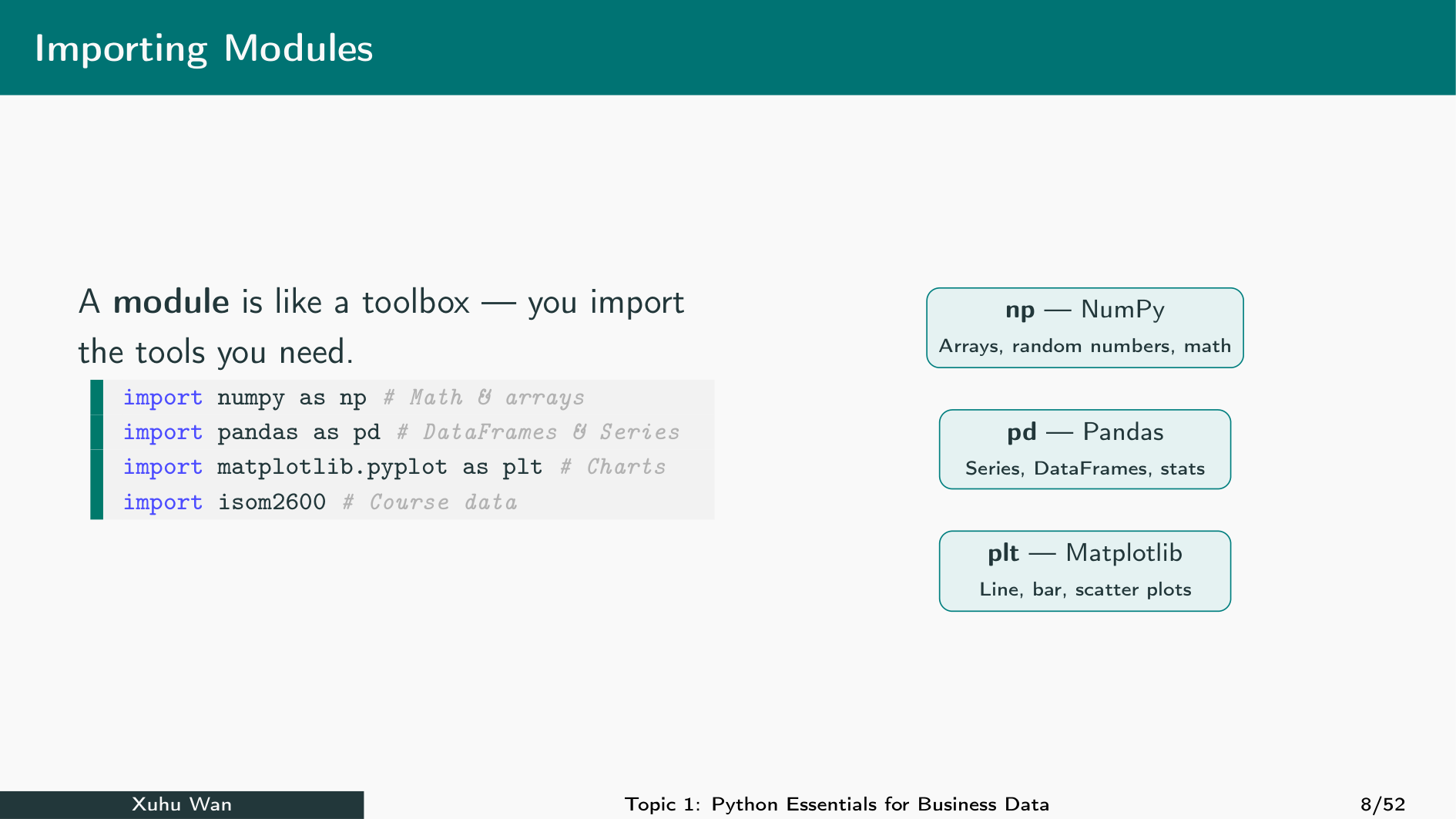
import numpy as np · import pandas as pd · import matplotlib.pyplot as plt · from scipy import stats
Wildcard Imports and Common Errors
from math import * is another form. It brings many public names into the session. Prefer explicit imports so the source of each name is clear.
| Error | Check |
|---|---|
ModuleNotFoundError |
Package spelling and current environment |
NameError: np is not defined |
Whether import numpy as np ran |
AttributeError |
Function spelling; overwritten module name |
Check: installed or imported?
NumPy is installed, but a freshly restarted kernel reports NameError: np is not defined. What should you run first?
import numpy as np%pip install numpyon every restartnp = 0
Check: match the calling name
In a fresh session, you run from math import sqrt as root. Which call matches that import?
math.sqrt(144)sqrt(144)root(144)
Your turn: Match the import
Calculate the square root of 144 in two ways: with a module prefix and with a directly imported function.
Checkpoint: Both results are 12.0. The available calling name follows the import statement.
NumPy Arrays
Question: How do arrays calculate on many observations?
Result: Create arrays, inspect their structure and explain element-wise results.
Use the import rules from 0.5.1 to give numerical tools the name np.
Create a NumPy Array
NumPy provides arrays for numerical calculations. np.array(...) converts a list into an array. Import NumPy before using np.
List Multiplication versus Array Multiplication
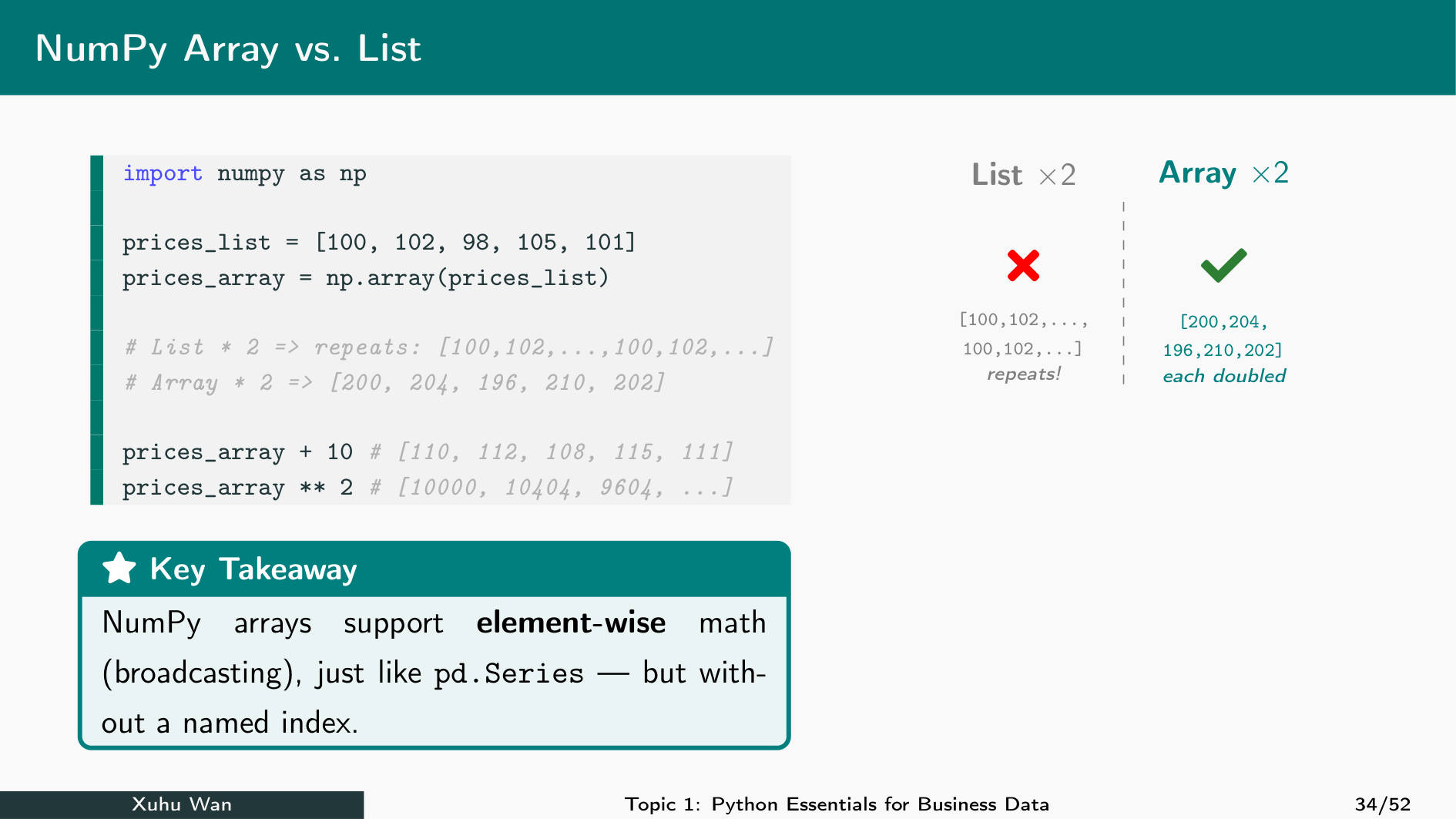
A list multiplied by 2 repeats its items. An array multiplied by 2 doubles each numerical value.
Array Multiplication: The Picture
The list repeats the sequence; the array produces one doubled value per original item. Repetition is valid list behaviour, but does not calculate doubled prices.
Array Attributes and Methods
An array is an object: it stores values and provides information and tools. The dot in prices.member accesses something belonging to prices.
| Kind | Meaning | Example |
|---|---|---|
| Attribute | Information about the object; read without () |
prices.dtype |
| Method | A function belonging to the object; call with () |
prices.sum() |
Predict, then try: which expressions use ()? Change prices.sum() to prices.mean() and run again. The method now calculates the average price.
Calculate Revenue Element by Element
For equally shaped arrays, corresponding positions are combined. Each position represents one dish category: Wonton, Char Siu and Veggie. Customer count × average bill gives that category’s daily revenue.
Units: customers/day × HK$/customer = HK$/day. The entries must refer to the same dishes in the same order; the total is HK$13,870/day.
A Scalar Applies to Every Element
A scalar is one value. Applying it to every array item is a simple form of broadcasting. Use it for price adjustments and percentage changes.
Conditions Create a Boolean Mask
A comparison returns one True/False result per item. Use the mask to select matching values. Its mean is the fraction of True values.
Two of four prices pass: 0.5, or 50%.
Array Summary Statistics
Use sum, mean, median, min, and max to summarise observations. Interpret the units: a mean is not a guarantee about every observation.
customers.mean() is an array method. np.median(customers) calls a function from NumPy with the array as its argument. The mean is the total divided by the count; the median is the middle of the ordered values.
Standard Deviation: Choose the Denominator
Standard deviation measures spread in the original units. NumPy defaults to ddof=0: variance divides by n. The usual sample standard deviation uses ddof=1: variance divides by n−1.
Outputs: 2.315 and 2.588 customers. Match the convention to the question; pandas defaults to ddof=1.
Random Numbers: A Reproducible Simulation
A simulation creates artificial data. A normal model is a bell-shaped distribution described by its mean and standard deviation. np.random.normal draws numbers from a normal model: loc=28 sets the mean to 28 minutes, scale=6 sets the standard deviation to 6 minutes, and size=5 asks for five numbers.
Keep the seed line when comparing runs; print the simulated values directly.
These are simulated delivery times, not observations. The np.random.seed(42) line makes the example repeatable; 42 is an arbitrary seed. Change size=5 to size=10 and run again to generate ten values. Part 0.5.3 explains the normal model.
Check: repetition or calculation?
For values = [2, 5] and array = np.array(values), what does array * 2 contain?
[2, 5, 2, 5][4, 10]- The scalar
14
Check: the standard-deviation convention
For the same five unequal customer counts, why is the result with ddof=1 larger than with ddof=0?
- The data have changed
- The mean has doubled
- The squared deviations are divided by 4 instead of 5
Your turn: A price increase
Increase all three prices by 10%, then select the updated prices above HK$50.
Checkpoint: The updated prices are 46.2, 63.8 and 30.8; only 63.8 exceeds 50.
SciPy Probability
Question: How does a probability model answer a business question?
Result: Read CDF, PPF and density outputs with units and stated assumptions.
Arrays summarise observed values; a probability model calculates what follows from assumptions.
SciPy: A Normal Probability Model
scipy.stats supplies probability distributions. A normal distribution is a bell-shaped model described by a mean and standard deviation. Its use is an assumption about the data. Here, loc=8 sets the mean to 8 minutes and scale=2 sets the standard deviation to 2 minutes. The methods model.mean() and model.std() report these chosen parameters.
CDF: A Value Gives a Probability
CDF means cumulative distribution function: P(X ≤ x). For the normal model with mean 8 and standard deviation 2, what fraction of waiting times is at most 10 minutes?
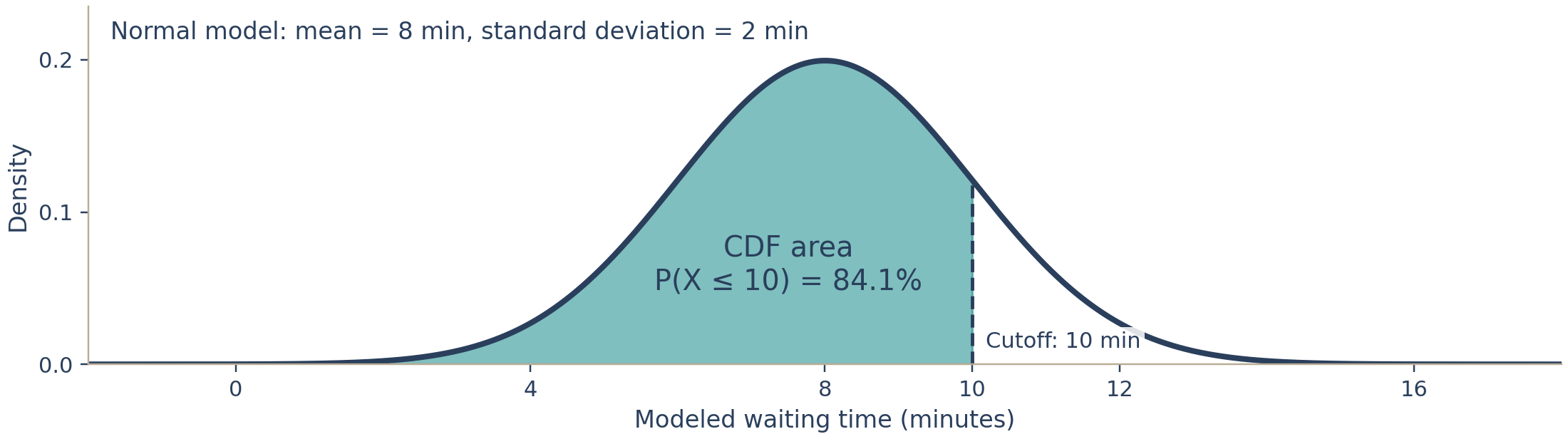
About 84.1% lie at or below 10 minutes under this model. For a continuous normal distribution, < and ≤ give the same probability.
Upper Tail: Exceeding a Limit
For the same normal model (mean 8, standard deviation 2), shade the area to the right of 10 minutes: P(X > 10). The total area is 1, so subtract the CDF’s left-hand area from 1.
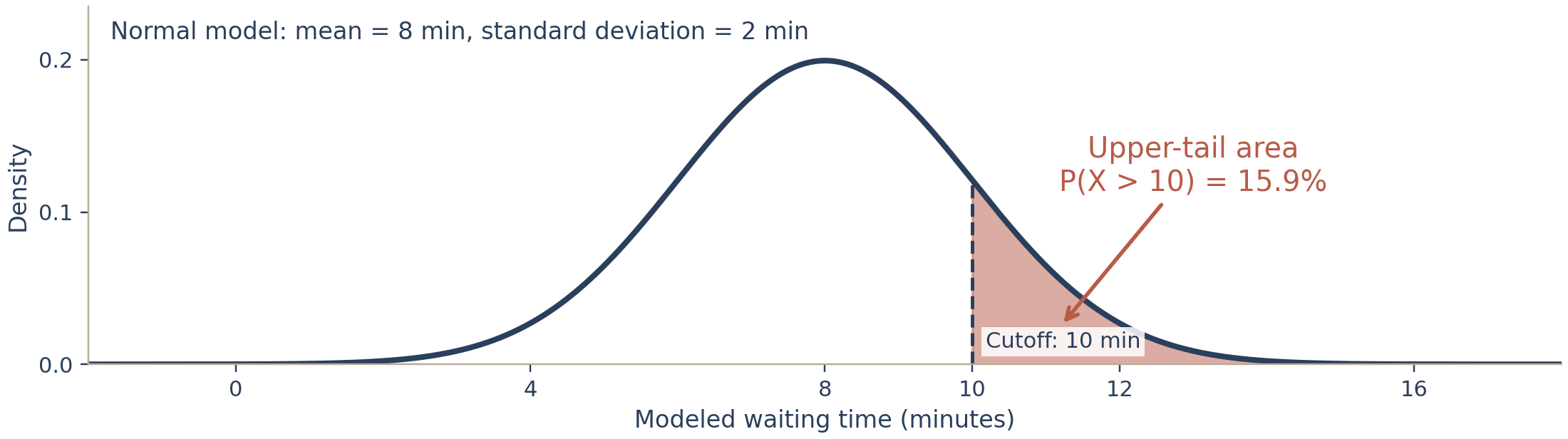
The shaded upper tail is about 15.9%. The two areas sum to 100%: 84.1% + 15.9%.
Probability Between Two Values
To find the probability between 6 and 10 minutes, subtract the cumulative probability up to 6 from the cumulative probability up to 10.
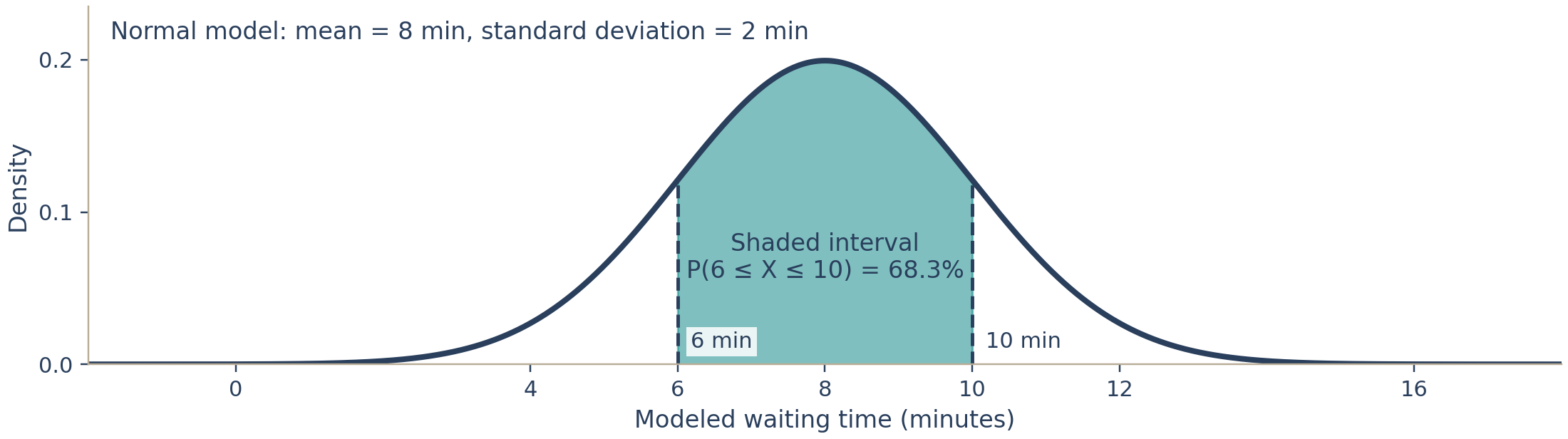
The probability is about 68.3%, matching the normal interval within one standard deviation of its mean.
PPF: A Probability Gives a Value
PPF means percent point function, the inverse CDF: probability → cutoff. Start with a shaded left-tail area of 5% and find the cutoff x. Here the normal model has mean 8 and standard deviation 2.
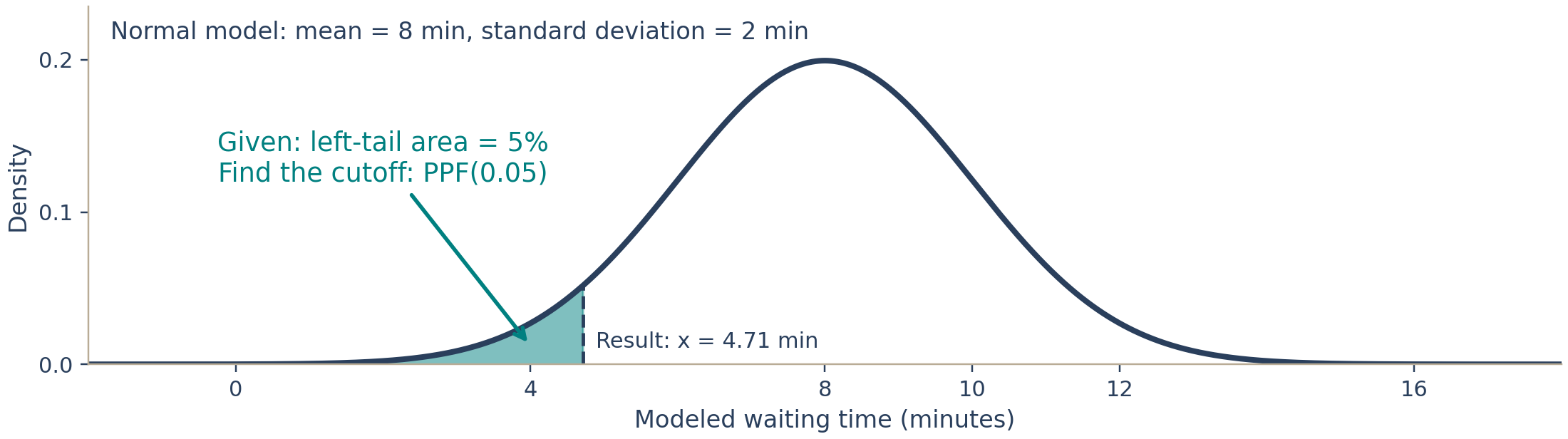
About 5% of modelled waiting times are at or below 4.71 minutes. Use 0.05, not 5.
Delivery-Time Service Target
A service-level agreement (SLA) is a promised service standard. Assume delivery times follow a normal model with mean 28 and standard deviation 6 minutes. How often is a 40-minute limit exceeded?
About 2.28% exceed 40 minutes; the modelled 95th percentile is 37.87 minutes. These are model estimates, not observed frequencies.
PDF: Density Is Not Probability
PDF is probability density, the height of a continuous distribution’s curve. Probability is area over an interval, not the height at a point.
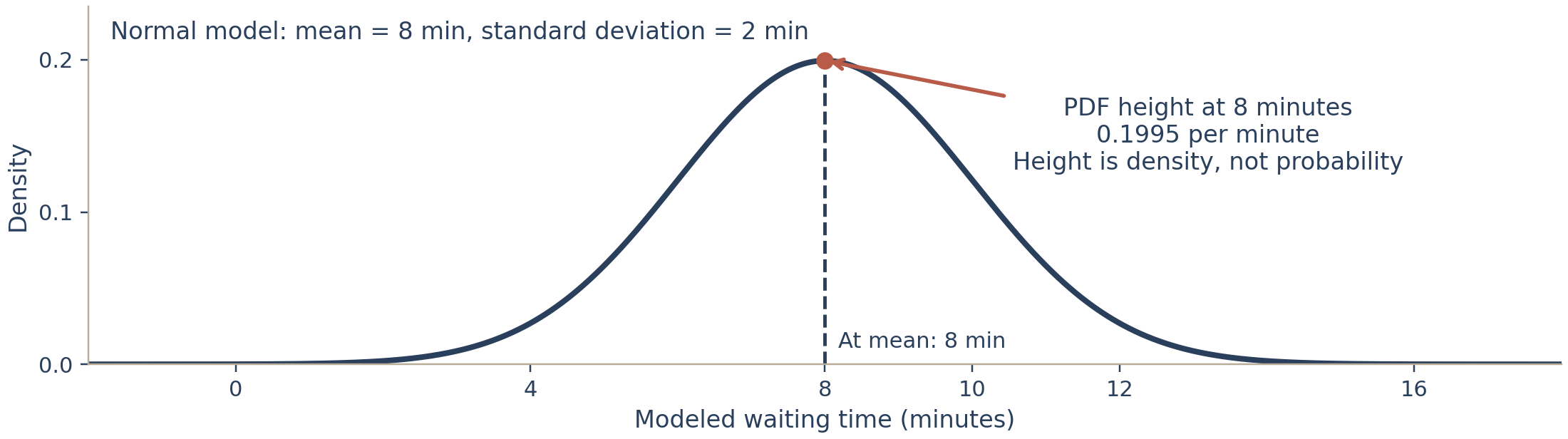
The density is about 0.1995 per minute; the cumulative probability is 0.5. They measure different things.
Check: cutoff or probability?
A manager wants a time limit that 95% of deliveries meet under a specified normal model. Which operation answers that question?
stats.norm.ppf(0.95, loc=28, scale=6)stats.norm.cdf(0.95, loc=28, scale=6)stats.norm.pdf(0.95, loc=28, scale=6)
Check: density and evidence
A normal PDF evaluated at 8 minutes gives approximately 0.1995. Which interpretation is correct?
- Exactly 19.95% of deliveries take 8 minutes
- This is a density; interval probability is an area under the curve
- The observed mean must be 8 minutes
Your turn: A 90% delivery target
For a normal model with mean 28 and standard deviation 6 minutes, find the 90th percentile. Pass it back into CDF to check the probability.
Checkpoint: About 35.69 minutes is the model’s 90th percentile; CDF returns 0.90. This is a model-based service target, not a guarantee for every order.
What you discovered
- Install packages into the environment; import names into the running session.
- Match the calling name to the import, including aliases and submodules.
- Arrays calculate by position; verify order, shape and units before combining them.
- A mask selects values; its mean is a proportion. State the standard-deviation denominator.
- CDF maps a cutoff to a probability; PPF reverses that direction. PDF is density.
- Simulation and model estimates depend on assumptions; they are not observed facts.
Next: Chapter 1 adds observation labels with pandas Series and DataFrames.
The bridge to the Week 1 case
policy = {"percentile": 0.75, "capacity": 100}
policy["percentile"] = 0.90
print(policy["capacity"])
Before running, explain which value changed and which value did not. A dictionary keeps named policy choices separate.
In Chapter 1 you will apply a percentile to a labelled price column, select candidates and keep at most capacity products. A function will express a repeated calculation.
Case question: which products deserve further review, and what additional evidence would justify an action? Correct code is one part of that explanation.
Chapter Summary
| Concept | Tool |
|---|---|
| Arithmetic and division | + - * / // % **; / → float, // floors |
| Types and conversion | type(), int(), float(), str(), bool() |
| Sequences | s[start:stop:step], len(), in |
| Strings | .strip(), .upper(), .replace(), .split(), immutable |
| Lists / tuples | .append(), .insert(), .pop(), .copy(); (a, b) immutable |
| Sets / dicts | set(), .add(), .union(); d[k], d.get(k, default), .items() |
| Control flow | if/elif/else, for, enumerate, range, while, break, continue |
| Comprehensions | [f(x) for x in xs if c], {k: v for …} |
| Functions | def, defaults, *args, **kwargs, lambda, docstrings, scope |
| Text and errors | f"{x:.2f}", zip, try/except SpecificError |
Chapter Summary: numerical tools
| Concept | Tool | Check |
|---|---|---|
| Environment and running session | pip, import, as, from |
Is the package available, and is the calling name defined? |
| Numerical arrays | np.array, shape, dtype, masks |
Are values in the same observation order? |
| Numerical summaries | mean, median, standard deviation | What are the units and denominator? |
| Probability model | stats.norm.cdf, ppf, pdf |
What goes in, what comes out, and which assumptions justify it? |
Next: Chapter 1 — labelled observations with pandas.
Discussion Questions
b = afor a list andb = afor an integer behave differently when you then “changeb”. Explain, using the words object, name, and immutable, why there is in fact no difference in what=does.- A colleague computes the average of a 20-price window with
prices[i:i+19]. What is wrong, how would you catch it with oneprint, and why might a plausible average still be wrong? - When would you choose
d[name]overd.get(name, default)in production code, given that only one of them can crash your pipeline at 3 a.m.? - Rewrite the Tiny Text Stats loop as a single comprehension plus
collections.Counter. What did you gain, and what did the beginner reading your code lose?
ISOM 5650 · Prof. Xuhu Wan · HKUST Business School